CapCut Screen Recorder: Record, Edit, and Share Your Screen with Ease
CapCut Screen Recorder is a free and powerful screen recording tool developed by capcutweb. With this versatile software, you can effortlessly record, edit, and share your screen in any situation.
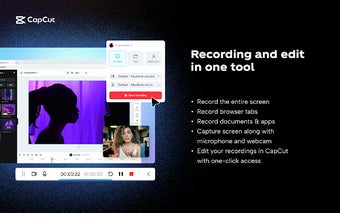
This user-friendly screen recorder allows you to capture your entire screen, specific browser tabs, documents, and apps with just a few clicks. You can even include your microphone and webcam in your recordings for a more comprehensive experience.
One of the standout features of CapCut Screen Recorder is its integration with the CapCut online video editor. Once you've finished recording, you can easily enhance your content with a wide range of stickers, effects, subtitles, transitions, filters, templates, and more. This allows you to take your videos to the next level and make them truly stand out.
With CapCut Screen Recorder, you don't have to worry about payments or time limitations. You can enjoy up to 1 hour of recording per session and all your recordings are automatically saved to the CapCut cloud space. This makes it easy to view, edit, download, and share your videos whenever you need to.
Sharing your recordings is a breeze with CapCut Screen Recorder. With just one click, you can share your videos to multiple social media platforms such as TikTok, YouTube, Facebook, and Instagram.
Whether you're conducting online classes, giving product demos, or discussing work matters, CapCut Screen Recorder has got you covered. It's a reliable and feature-packed screen recording tool that you can access right from your Chrome browser.
Try CapCut Screen Recorder today and experience the convenience and power of recording, editing, and sharing your screen in one comprehensive package.